기존(310)/🏀SpringBoot
[스프링부트] -1 세팅하기 pom.
조각남자
2022. 8. 9. 18:53

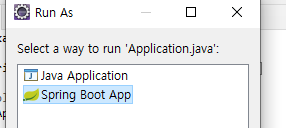
# 스프링부트 실행
|
1
2
3
4
5
6
7
8
9
10
11
12
13
14
15
16
17
18
19
20
21
22
23
24
25
26
27
28
29
30
31
32
33
34
35
36
37
38
39
40
41
42
43
44
45
46
47
|
#MySql 연결
<!-- MySQL JDBC 드라이버 -->
<dependency>
<groupId>mysql</groupId>
<artifactId>mysql-connector-java</artifactId>
<version>8.0.11</version>
</dependency>
mysql mysql-connector-java 8.0.11
<!-- Oracle JDBC 드라이버 -->
<dependency>
<groupId>com.oracle</groupId>
<artifactId>ojdbc7</artifactId>
<version>12.1.0.2</version>
</dependency>
<!-- re 스타트-->
<dependency>
<groupId>org.springframework.boot</groupId>
<artifactId>spring-boot-devtools</artifactId>
<optional>true</optional>
</dependency>
<!-- 인젝터 -->
<dependency>
<groupId>javax.inject</groupId>
<artifactId>javax.inject</artifactId>
<version>1</version>
</dependency>
|
cs |
###
|
1
2
3
4
5
6
7
8
9
10
11
12
13
14
15
16
17
18
19
20
21
22
23
24
25
26
27
28
29
30
31
32
33
34
35
36
37
38
39
40
41
42
43
44
45
46
47
48
49
50
51
52
53
54
55
56
57
58
59
60
61
62
63
64
65
66
67
68
69
70
71
72
73
74
75
76
77
78
79
|
# db connection(oracle)
spring.datasource.driver-class-name=oracle.jdbc.driver.OracleDriver
spring.datasource.url=jdbc:oracle:thin:@localhost:1521:xe
spring.datasource.username=spring
spring.datasource.password=1234
#http port
server.port=80
# custom error page
server.error.whitelabel.enabled=false
# thymeleaf auto refresh
spring.thymeleaf.cache=false
# db connetino( mysql )
spring.datasource.driver-class-name=com.mysql.cj.jdbc.Driver
spring.datasource.url=jdbc:mysql://localhost/mysql
spring.datasource.username=root
spring.datasource.password=root
#http port
server.port=80
# custom error page
server.error.whitelabel.enabled=false
# thymeleaf auto refresh
spring.thymeleaf.cache=false
<!-- Applecation.java
package com.example.spring;
import javax.sql.DataSource;
import org.apache.ibatis.session.SqlSessionFactory;
import org.mybatis.spring.SqlSessionFactoryBean;
import org.mybatis.spring.SqlSessionTemplate;
import org.mybatis.spring.annotation.MapperScan;
import org.springframework.boot.SpringApplication;
import org.springframework.boot.autoconfigure.SpringBootApplication;
import org.springframework.context.annotation.Bean;
@SpringBootApplication
@MapperScan("com.example.spring.model") // 모델 하위 xml 파일 읽어오기 mybatis 인터페이스 매퍼 탐색함
public class Application {
public static void main(String[] args) { //시작메서드
SpringApplication.run(Application.class, args);
}
@Bean // bean 을 생성 <beams:bean id = .. 이런작업을 @Bean 으로 처리 서버가올라오면 자동으로 올라감
public SqlSessionFactory sqlSessionFactory(DataSource dataSource) throws Exception{
SqlSessionFactoryBean bean = new SqlSessionFactoryBean();
bean.setDataSource(dataSource);
return bean.getObject();
}
@Bean
public SqlSessionTemplate sqlSession(SqlSessionFactory factory) {
return new SqlSessionTemplate(factory);
}
}
|
cs |