기존(310)/🐳React
[React] Button component 사용하기
조각남자
2023. 12. 23. 15:34

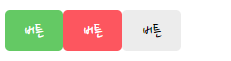
완성본
1. 총 3가지의 버튼을 생성하기
<MyButton text={'버튼'} onClick={()=>alert("버튼클릭")} type={"positive"} />
<MyButton text={'버튼'} onClick={()=>alert("버튼클릭")} type={"negative"} />
<MyButton text={'버튼'} onClick={()=>alert("버튼클릭")} type={"default"} />
2. MyButton을 컴포넌트화 시켜주기
: 위에서 text , type , onclick 을 파라미터 변수로 받아줘서
* btnType = > positive,negative 이 아닌 다른 값이 들어오면 강제로 "default" 로 변경해주는 함수.
* MyButton.defaultProprs = > type값이없으면 "default" 로 만들어준다.
const MyButton = ({text,type,onClick}) => {

    // positive 나 negative 아니면 강제로 default 타입으로 넣어줌
    const btnType = ['positive','negative'].includes(type)? type:'default';

  return (
      // class 이름을 추가생성해준다.
      <button className={["MyButton",`MyButton_${btnType}`].join(" ")} onClick={onClick}>
          {text}
      </button>
  )
}

// default 값이 type 이 default
MyButton.defaultProps = {
    type: "default",
};

export default MyButton;