[React] React, TypeScript, and Tailwind CSS 설치

React, TypeScript, and Tailwind CSS with Vite in a Project
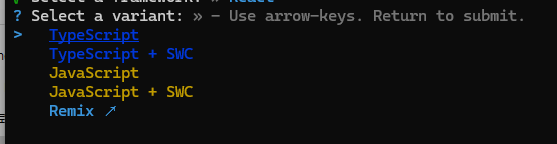
Step 1 — 프로젝트 생성
npm create vite@latest

Step 2 — Tailwind CSS 생성
npm install -D tailwindcss postcss autoprefixer3단계 - 구성 파일 생성
npx tailwind init -p
이 명령은 tailwind.config.js 및 postcss.config.js 구성 파일을 생성합니다 . 이 파일은 프로젝트와 상호 작용하고 사용자 정의하는 데 도움이 됩니다.
4단계 - Tailwind CSS에 대한 소스 경로 구성
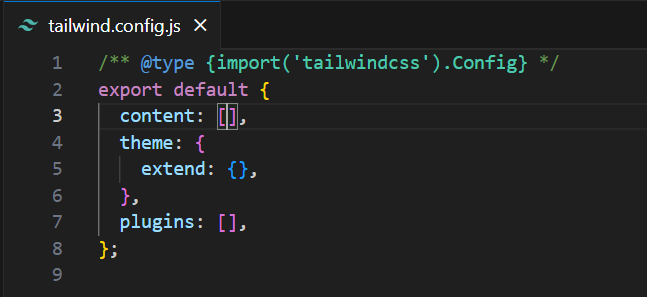
이제 tailwind.config.js 파일 에 템플릿 파일의 경로를 추가해야 합니다 . 템플릿 파일에는 HTML 템플릿, JavaScript 구성 요소 및 Tailwind 클래스 이름이 포함된 다른 소스 파일이 포함됩니다. 이는 해당 요소에 대해 vanilla CSS가 생성되도록 하기 위한 것입니다.
현재 tailwind.config.js 파일은 다음과 같습니다.
"./index.html" , "./src/**/*.{js,ts,jsx,tsx}"
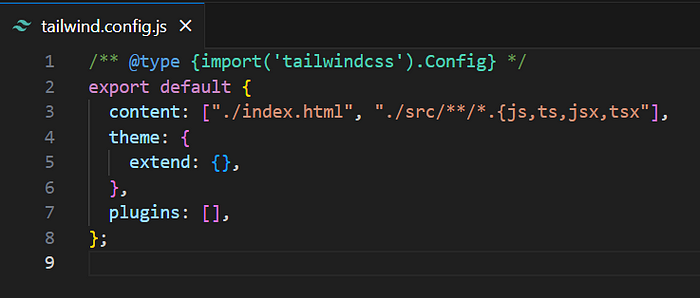
*.{js,ts,jsx,tsx} 사이에 공백을 추가하지 않도록 주의하세요 .
5단계 - CSS에 Tailwind 지침 추가
Tailwind 지시문은 Tailwind CSS가 빌드 프로세스 중에 특정 기능이나 구성을 처리하도록 지시하는 Tailwind 전용 사용자 지정 명령문입니다.
우리는 index.css 파일 에 아래에 주어진 문장을 추가해야 합니다 . 하지만 그 전에 index.css 파일 의 모든 내용을 지웁니다 . 이제 Tailwind 지시문을 추가합니다:-
@tailwind base;
@tailwind components;
@tailwind utilities;
이러한 지시어는 Tailwind CSS의 해당 부분을 CSS 파일에 포함하는 데 사용됩니다. 이러한 지시어는 일반적으로 CSS 파일 내에서 Tailwind CSS에서 제공하는 기본 스타일, 구성 요소 스타일 및 유틸리티 클래스가 최종 출력에 포함되도록 하는 데 사용됩니다.
App.css 파일을 제거할 수도 있습니다 .
6단계 - Tailwind CSS 사용 시작
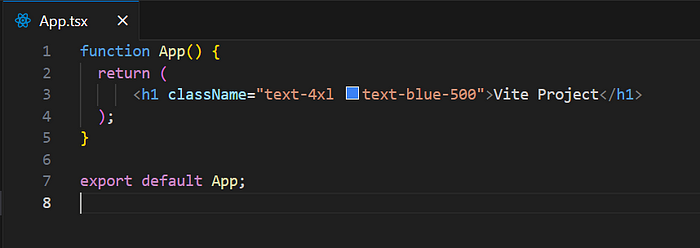
이제 tailwind를 사용할 수 있습니다. App.tsx 파일을 열면 이제 Tailwind CSS 클래스를 사용할 수 있습니다.
----------------------- shadcn/ui 설치
vite.config.js 수정
타입스크립트를 사용하고 있기 때문에 vite-plugin-dts 와 @types/node 패패키지를 설치해준다.
npm i -D vite-plugin-dts @types/node
설치가 끝났으면, vite.config.js 를 아래와 같이 수정한다.
import { defineConfig } from 'vite'
import react from '@vitejs/plugin-react'
import * as path from "node:path";

// https://vitejs.dev/config/
export default defineConfig({
  resolve: {
    alias: {
      $lib: path.resolve("./src/lib"),
    },
  },
  plugins: [react()],
})
jsconfig.json (또는 tsconfig.json) 파일에서 아래의 코드를 추가합니다.
"baseUrl": ".",
"paths": {
    "$lib": ["./src/lib"],
    "$lib/*": ["./src/lib/*"]
},
{
"compilerOptions": {
"target": "ES2020",
"useDefineForClassFields": true,
"lib": ["ES2020", "DOM", "DOM.Iterable"],
"module": "ESNext",
"skipLibCheck": true,
/* Bundler mode */
"moduleResolution": "bundler",
"allowImportingTsExtensions": true,
"resolveJsonModule": true,
"isolatedModules": true,
"noEmit": true,
"jsx": "react-jsx",
"declaration": true,
"typeRoots": ["./dist/index.d.ts"],
/* Linting */
"strict": true,
"noUnusedLocals": true,
"noUnusedParameters": true,
"noFallthroughCasesInSwitch": true,
"baseUrl": ".",
"paths": {
"$lib": ["./src/lib"],
"$lib/*": ["./src/lib/*"]
}
},
"include": ["lib"],
"references": [{ "path": "./tsconfig.node.json" }]
}
components.json
{
  "$schema": "https://ui.shadcn.com/schema.json",
  "style": "default",
  "rsc": true,
  "tsx": true,
  "tailwind": {
    "config": "tailwind.config.js",
    "css": "src/index.css",
    "baseColor": "slate",
    "cssVariables": true,
    "prefix": ""
  },
  "aliases": {
    "components": "src/components",
    "utils": "$lib/utils"
  }
}